.svg)

Introduction
Waiting for a payment payout that never appears in your bank account can be frustrating, especially when you depend on those funds to manage business expenses, pay suppliers, or maintain your cash flow. You may see a payment marked as completed on your payment platform, yet your bank balance remains unchanged.
So, why hasn't your payment payout reached your bank account?
Several factors can explain a delayed payout, including bank processing times, weekends and public holidays, payment processor verification requirements, incorrect banking details, and security reviews. In some cases, the funds have already been sent but have not yet been credited to your account. In others, the payout may still be pending or may have failed altogether.
Understanding how the payment payout process works can help you identify the problem, determine whether the delay is normal, and take the appropriate steps to receive your money.
In this guide, we'll explore the most common reasons payment payouts get delayed, how to troubleshoot missing bank deposits, and what you can do to prevent similar issues in the future.
What Is a Payment Payout?
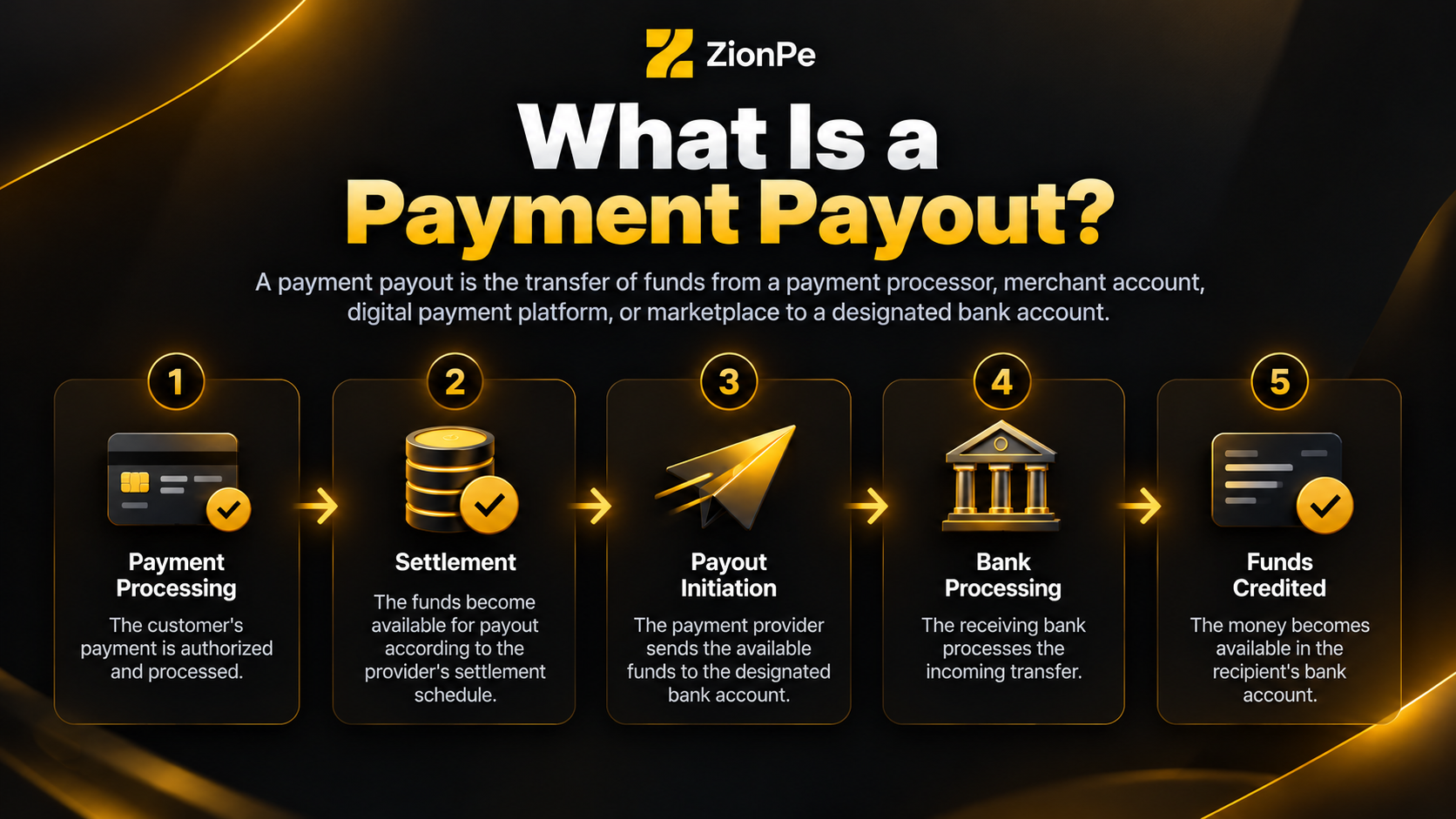
A payment payout is the transfer of funds from a payment processor, merchant account, digital payment platform, or marketplace to a designated bank account.
For example, when a customer purchases a product from an online store, the payment may first be processed through a payment gateway or payment service provider. After the transaction is processed and the funds become available for settlement, the provider initiates a payout to the merchant's bank account.
However, receiving a successful customer payment does not necessarily mean the money will appear in the merchant's bank account immediately.
The process generally involves several stages:
Each stage can involve different processing times, depending on the payment method, country, financial institutions, and payment provider.
Payment processing:
The customer's payment is authorized and processed.
Settlement:
The funds become available for payout according to the provider's settlement schedule.
Payout initiation:
The payment provider sends the available funds to the designated bank account.
Bank processing:
The receiving bank processes the incoming transfer.
Funds credited:
The money becomes available in the recipient's bank account.
Understanding these stages is essential because a delay can occur at any point in the payout process.
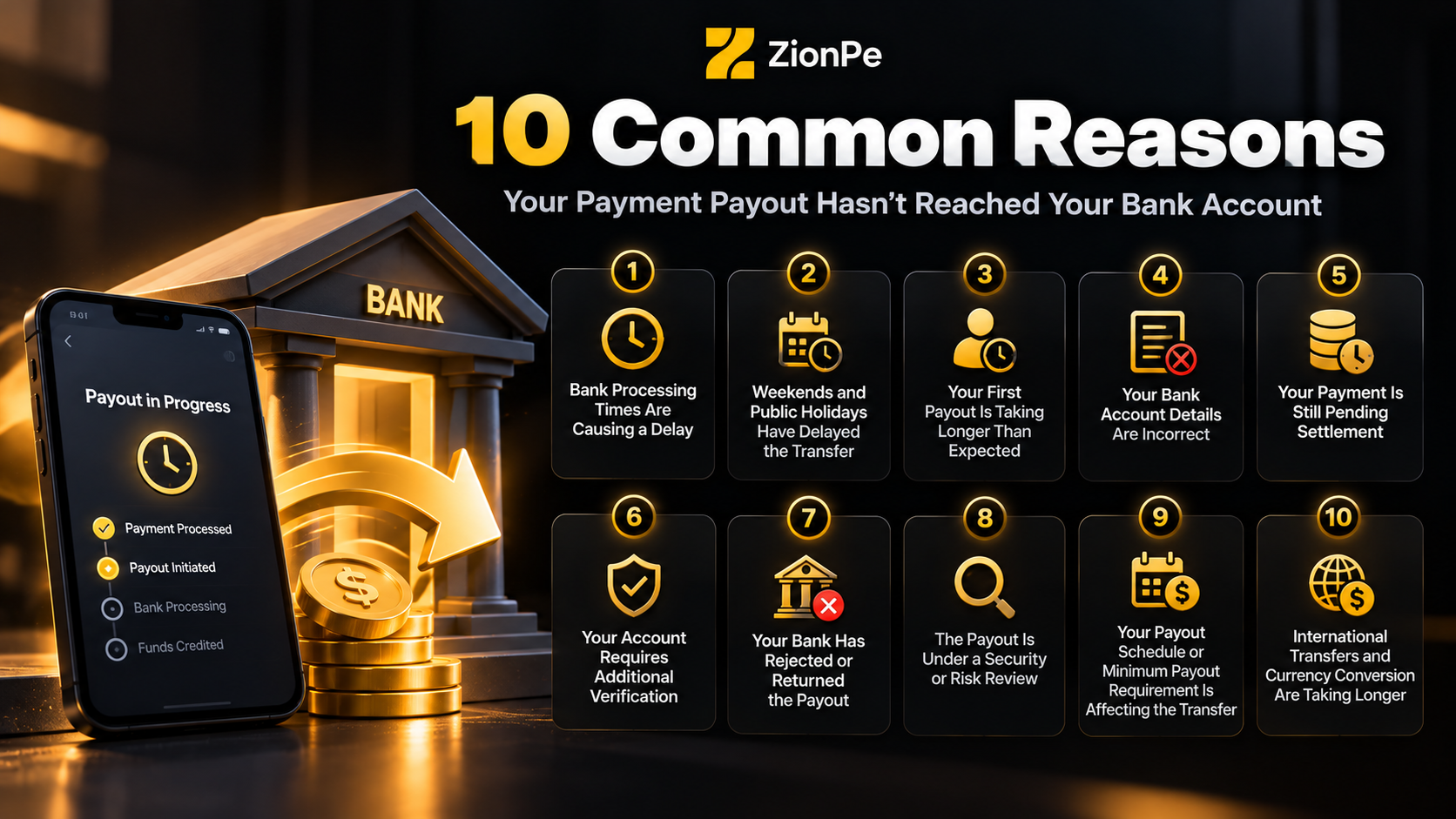
10 Common Reasons Your Payment Payout Hasn't Reached Your Bank Account
1. Bank Processing Times Are Causing a Delay
One of the most common reasons a payment payout has not reached your bank account is that the receiving bank is still processing the transfer.
Even after a payment provider marks a payout as sent or paid, the receiving bank may need additional time to process and credit the funds. The exact timeframe depends on the banking network, transfer method, destination country, and the policies of the financial institutions involved.
For example, a standard bank transfer may take several business days, whereas some instant payment methods can deliver funds much faster.
some banks may take two to three additional days to post funds after receiving a payout.
What can you do?
- Check the estimated payout arrival date in your payment dashboard.
- Confirm whether the payout status is pending, processing, in transit, or paid.
- Review your bank account for incoming transactions that may not yet be reflected in your available balance.
- Contact your bank if the expected processing window has passed.
A payout marked as paid does not always mean the money is immediately available for use.
2. Weekends and Public Holidays Have Delayed the Transfer
Bank transfers do not always follow calendar days. Many payment systems and banking networks process standard transfers according to business-day schedules.
If your payout is initiated on a Friday evening, during a weekend, or immediately before a public holiday, the transfer may not progress until the next business day.
For example, a payout initiated on Friday may experience additional delays if Saturday and Sunday are non-processing days for the relevant banks. A public holiday in the sender's or recipient's country can also affect the timeline.
International transfers may be particularly sensitive to holidays because multiple financial institutions and payment networks may be involved.
What can you do?
- Check the public holiday calendar for your country and your bank's operating schedule.
- Calculate the expected arrival date using business days rather than calendar days.
- Check whether the payout provider has published any processing notices.
- Wait until the next applicable banking day before treating a routine delay as a missing payment.
Always consider weekends and holidays when estimating when your payout should arrive.
3. Your First Payout Is Taking Longer Than Expected
If you have recently opened a merchant account or started using a payment service, your first payout may take longer than subsequent payouts.
Check the estimated payout arrival date in your payment dashboard.
Confirm whether the payout status is pending, processing, in transit, or paid.
Review your bank account for incoming transactions that may not yet be reflected in your available balance. Contact your bank if the expected processing window has passed.
Check the public holiday calendar for your country and your bank's operating schedule. Calculate the expected arrival date using business days rather than calendar days.
Check whether the payout provider has published any processing notices.
Wait until the next applicable banking day before treating a routine delay as a missing payment.
Payment providers sometimes apply additional verification and risk assessment procedures before releasing an initial payout. These checks can help confirm business ownership, validate account information, and assess transaction activity.
The initial payout timeline varies by provider, country, industry, and account circumstances.
For example, ZionPe involves a waiting period of 7 days for new users, although the timeline can vary.
This timeframe is specific to that provider and should not be treated as a universal rule for all payment platforms.
What can you do?
- Review the first-payout timeline provided when you registered.
- Check whether your identity, business, or bank account verification is complete.
- Look for emails or dashboard notifications requesting additional information.
- Contact the provider if your first payout exceeds the estimated timeframe.
Before assuming something has gone wrong, verify whether your payment account has a longer initial settlement period.
4. Your Bank Account Details Are Incorrect
Incorrect bank account information can prevent a payout from reaching its intended destination.
Even a small error in an account number, routing number, bank code, or other required banking information can cause a transfer to be rejected, returned, or sent to an unintended account if the supplied details correspond to a valid account.
Common issues include:
- Review the first-payout timeline provided when you registered.
- Check whether your identity, business, or bank account verification is complete.
- Look for emails or dashboard notifications requesting additional information.
- Contact the provider if your first payout exceeds the estimated timeframe.
The exact information required depends on the country and transfer method.
What can you do?
- Open your payment provider's account or payout settings.
- Verify the registered bank account details.
- Confirm that the account is active and eligible to receive the relevant type of payment.
- Check the payout destination associated with the specific transaction.
- Contact the payment provider if the payout was sent using incorrect details.
5. Your Payment Is Still Pending Settlement
A customer payment can be successful without the funds being immediately available for payout.
Review the first-payout timeline provided when you registered.
Check whether your identity, business, or bank account verification is complete. Look for emails or dashboard notifications requesting additional information. Contact the provider if your first payout exceeds the estimated timeframe.
An incorrect bank account number.
An outdated bank account linked to the payment platform.
An incorrect routing number, sort code, or local bank identifier.
A mismatch between the account holder's name and the registered details. An account that has been closed or restricted.
Open your payment provider's account or payout settings.
Verify the registered bank account details.
Confirm that the account is active and eligible to receive the relevant type of payment. Check the payout destination associated with the specific transaction.
Contact the payment provider if the payout was sent using incorrect details.
Payment processors may need to complete settlement procedures before releasing money to a merchant's bank account. Depending on the provider, location, and transaction type, this can involve a predefined settlement period.
For example, a business might receive payments from customers throughout the day but have those funds transferred to its bank account according to a scheduled payout cycle.
It is also important to distinguish between a payout schedule and settlement speed.
Settlement speed determines when transaction funds become available for payout.
Payout schedule determines how frequently available funds are transferred to your bank account.
A daily payout schedule does not necessarily mean every customer payment will reach your bank the following
day.
What can you do?
- Check your available balance rather than only your total transaction volume.
- Review the settlement period applicable to your account.
- Check whether the transaction has cleared or is still pending.
- Confirm whether the next payout has actually been initiated.
If the funds have not yet become available for payout, contacting your bank may not resolve the issue. The payment provider is usually the better starting point.
6. Your Account Requires Additional Verification
Payment providers may temporarily delay or restrict payouts when they need additional information to verify an account or review its activity.
Verification requirements can arise during onboarding, following changes to account information, or when a provider needs to satisfy applicable compliance and security obligations.
Depending on the circumstances, you may be asked to provide:
- Identity verification documents.
- Business registration information.
- Proof of address.
- Bank account ownership details.
- Information about specific transactions.
- Additional business or compliance documentation.
A payout may remain pending until the requested information has been submitted and reviewed.
What can you do?
- Check your payment dashboard, registered email address, and support notifications for outstanding verification requests.
- Submit the requested information through the provider's official channels.
- follow up if the review exceeds its stated timeframe.
Avoid submitting sensitive financial or identity documents through unofficial links or unverified messages.
7. Your Bank Has Rejected or Returned the Payout
Sometimes a payment provider successfully initiates a transfer, but the receiving bank cannot accept it.
This may happen if the bank account is closed, the account details are invalid, the account is restricted, or the account cannot receive the particular currency or transfer type.
Settlement speed determines when transaction funds become available for payout.
Check your available balance rather than only your total transaction volume. Review the settlement period applicable to your account.
Check whether the transaction has cleared or is still pending.
Confirm whether the next payout has actually been initiated.
Identity verification documents.
Business registration information.
Proof of address.
Bank account ownership details.
Information about specific transactions.
Additional business or compliance documentation.
When a transfer is rejected, the funds may be returned to the payment provider. However, the return process can take additional time, meaning the money may not immediately reappear in your available balance.
In other cases, the bank may need to investigate the transfer before confirming its status.
What can you do?
- Contact your bank to determine whether it rejected or returned the transfer.
- Ask the bank whether the account can receive the relevant payment type and currency.
- Check your payment dashboard for a failed or returned payout status.
- Request confirmation from the payment provider about whether the funds have been returned.
- Correct any account information issues before attempting another payout.
Do not assume that a rejected transfer has been permanently lost. The funds may be in the process of being returned or reprocessed.
8. The Payout Is Under a Security or Risk Review
Payment providers use risk monitoring and security controls to identify potentially suspicious activity and protect businesses, customers, and financial systems.
In some circumstances, a payout may be delayed while a transaction or account undergoes additional review.
Potential triggers can include unusual transaction patterns, a sudden change in payment volume, disputes, chargebacks, or activity that requires further verification. These are possible examples, not proof that any particular account has triggered a review.
A review does not automatically mean that wrongdoing has occurred. It may simply mean the provider needs additional information before proceeding.
What can you do?
- Review your configured payout frequency.
- Confirm the next scheduled payout date.
- Check whether a minimum balance is required.
- Review fees, refunds, disputes, and other balance adjustments.
- Determine whether a manual payout must be initiated.
If a payout is explicitly on hold, repeatedly requesting the transfer may not resolve the issue. The relevant review or verification process generally needs to be completed first.
9. Your Payout Schedule or Minimum Payout Requirement Is Affecting the Transfer
Some payment platforms allow users to choose daily, weekly, monthly, or manual payouts. If you expect a daily transfer but your account is configured for weekly payouts, the funds may not be sent when you anticipate.
Certain providers and payment methods may also impose minimum payout thresholds. If your available balance is below the applicable minimum, a payout may not be initiated until the requirement is met.
Other factors, such as negative balances, refunds, processing fees, or payment adjustments, can affect the amount available for payout.
What can you do?
- Review your configured payout frequency.
- Confirm the next scheduled payout date.
- Check whether a minimum balance is required.
- Review fees, refunds, disputes, and other balance adjustments.
- Determine whether a manual payout must be initiated.
Understanding your account's payout settings can help you distinguish a genuine delay from a transfer that has not yet been scheduled.
10. International Transfers and Currency Conversion Are Taking Longer
International payouts may involve additional processing steps compared with domestic transfers.
Depending on the transfer route, funds may pass through intermediary banks, cross-border payment networks, or currency conversion services before reaching the recipient.
Delays may arise from different banking hours, currency conversion procedures, local payment regulations, additional verification requirements, or intermediary bank processing.
For example, a business receiving international payments may see the payout marked as initiated while the transfer is still progressing through the banking network.
What can you do?
- Confirm the expected processing time for the destination country.
- Verify the payout currency and receiving account currency.
- Check whether the transfer requires intermediary bank information.
- Ask your payment provider for the transfer reference or tracking details.
- Contact your bank to determine whether it has received the transfer or needs additional information.
International transfers should be assessed according to the specific payment route rather than the timelines used for domestic bank transfers.
What Should You Do If Your Payment Payout Hasn't Arrived?
If your payout is missing, following a structured troubleshooting process can help you identify where the delay is occurring.
Step 1: Check the Payout Status
Log in to your payment provider's dashboard and locate the relevant payout. Look for statuses such as:
Pending: The payout may not yet have been initiated or may be awaiting an internal step.
Processing or in transit: The transfer is being processed, although the precise meaning depends on the provider.
Paid or completed: The provider reports that the payout has been sent or completed, but the receiving bank may still need to post it.
Failed or returned: The transfer could not be completed as intended and may require corrective action.
Status labels differ between providers, so consult the relevant platform's documentation for their exact meanings.
Failed or returned: The transfer could not be completed as intended and may require corrective action. Status labels differ between providers, so consult the relevant platform's documentation for their exact
meanings.
Step 2: Verify the Expected Arrival Date
Find the estimated payout date and determine when the transfer was initiated. Consider the following:
The provider's settlement period.
The payout schedule.
Weekends and public holidays.
The receiving bank's processing times.
Any additional time required for international transfers.
Compare the actual delay with the provider's published timeframe before deciding whether the payout is overdue.
Step 3: Confirm Your Bank Account Information
Check that the bank account associated with the payout is correct and active.
If you have recently changed your account details, confirm which account was linked when the payout was initiated. Review any notifications indicating that a transfer was sent to a previous account.
Step 4: Review Notifications and Verification Requests
Check your dashboard, registered email address, and support messages for outstanding actions.
A request for additional documents, an account review, or a notification of failed bank details may explain why the payout has not progressed.
Step 5: Contact the Payment Provider
If the payout has not been initiated, remains pending beyond its expected schedule, or is marked as failed, contact the payment provider.
Provide the relevant transaction information and ask for the specific reason for the delay.
Step 6: Contact Your Bank if the Payout Was Sent
If the provider confirms that the payout has been sent and the expected arrival window has passed, contact your bank.
Ask whether the incoming transfer has been received, rejected, returned, or placed under review.
Where available, provide the payout reference number or transfer trace ID so the bank can investigate more effectively.
Payment Provider vs. Bank: Whom Should You Contact?
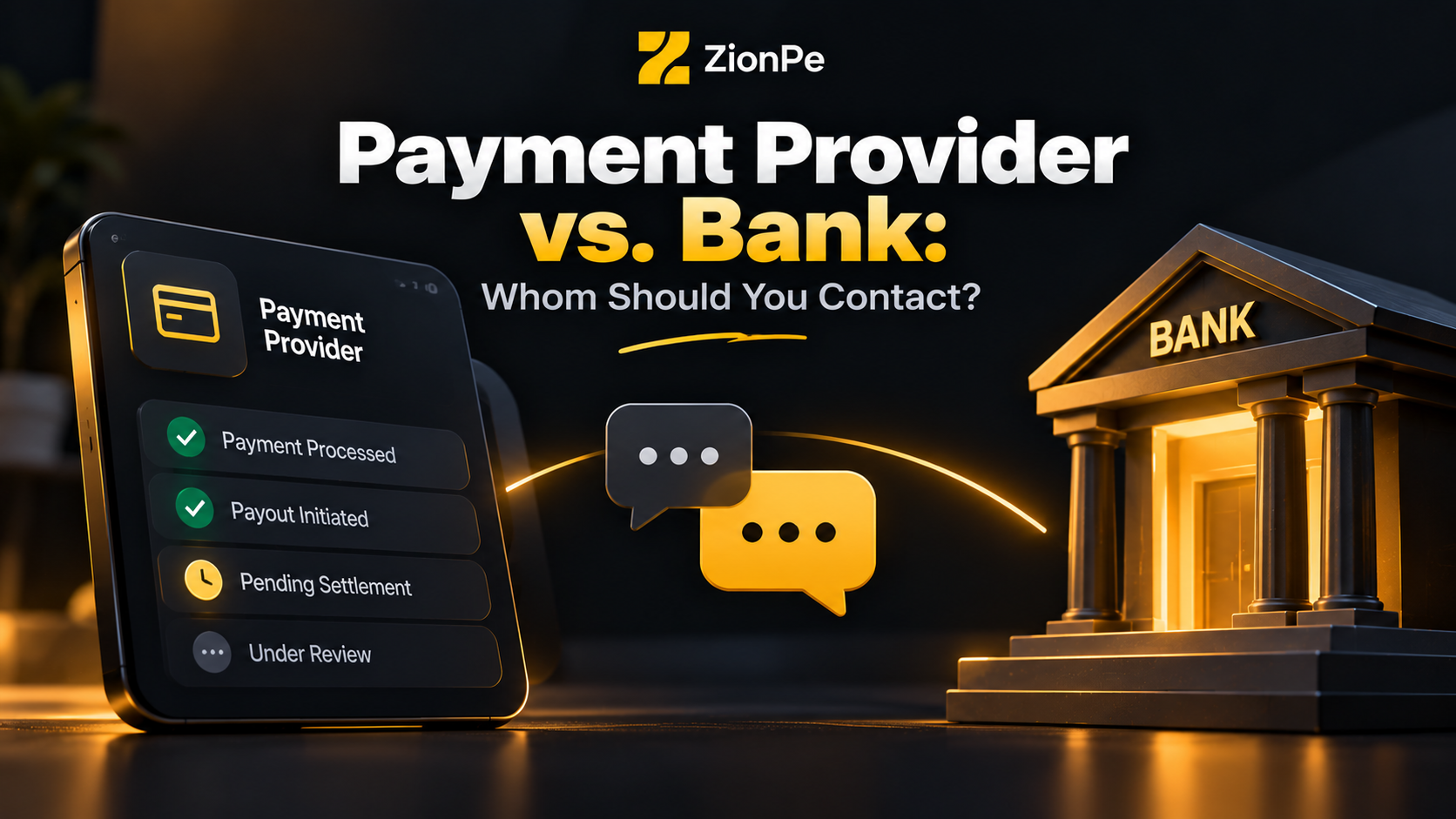
Choosing the right support channel can save time when investigating a missing payout.
Weekends and public holidays.
The receiving bank's processing times.
Any additional time required for international transfers.
Situation
Who to contact first
Payout has not been initiated
Payment provider
Funds are still pending settlement
Payment provider
Account verification is incomplete
Payment provider
Payout failed because of bank details
Payment provider and bank, as needed
Payout is marked as sent but has not arrived
Receiving bank and payment provider
Bank confirms the transfer was rejected
Bank and payment provider
International transfer is delayed
Payment provider, followed by the receiving bank
Payout is under an account review
Payment provider
The general rule is straightforward: contact the payment provider when the payout has not been released, and contact the bank when the transfer has reportedly been sent but cannot be located.
Depending on the payment method, both organizations may need to investigate the same transaction.
How Long Should a Bank Payout Take?
There is no single payout timeline that applies to every payment provider, bank, country, and transfer method.
Some payment methods support near-instant transfers, while standard bank payouts may take several business days. Additional settlement periods, account verification, and international processing can extend the timeline.
The following table provides a general guide, not a guarantee of delivery.
Payout situation
What to expect
Instant or real-time transfer
May arrive within seconds or minutes, depending on eligibility and the payment network
Standard domestic bank payout
Often takes one or several business days
Weekend or holiday payout
May be processed on the next applicable business day
First payout from a new provider
May take longer because of onboarding or verification
International bank transfer
Can require several business days or longer, depending on the route
Payout under review
Timing depends on the review and any outstanding requirements
Failed or returned payout
Additional time may be needed for the funds to return or be resent
For the most accurate estimate, always consult your provider's payout schedule and the receiving bank's transfer policies.
If the estimated delivery date has passed, investigate the status rather than assuming the money will arrive automatically.
How to Prevent Future Payment Payout Delays
Although some payout delays are outside your control, several practical measures can help reduce avoidable problems.
Keep Your Bank Details Updated
Verify your account number, bank code, account holder information, and other required details whenever you add or change a payout account.
Use an active bank account that can receive the relevant transfer type and currency.
Complete Verification Early
Provide the required identity and business documents during onboarding whenever possible. Respond promptly to subsequent verification requests to minimize delays caused by incomplete information.
Understand Your Payout Schedule
Know whether your account uses daily, weekly, monthly, or manual payouts. Familiarize yourself with the settlement period so you can forecast when transaction funds should become available.
Monitor Your Payment Dashboard
Check payout statuses regularly and investigate failed transfers, unexpected holds, or changes to estimated arrival dates.
Keeping track of payouts can help you identify a recurring issue before it affects your business operations.
Maintain a Cash Flow Buffer
Businesses that rely on regular payouts should account for the possibility of temporary settlement delays.
Maintaining a reasonable cash reserve can help cover routine expenses, supplier payments, payroll, and other obligations when expected funds arrive later than planned.
Keep Transaction Records
Maintain records of payout dates, transaction amounts, fees, reference numbers, and bank deposits.
These records make it easier to reconcile payments, identify discrepancies, and provide accurate information when contacting customer support.
Frequently Asked Questions (FAQs)
1. Why does my payment say completed but the money isn't in my bank account?
A completed status may indicate that the payment provider has sent the payout, not that your bank has already credited the funds. Bank processing times, weekends, holidays, and transfer network delays can all affect when the money becomes available.
Check the expected arrival date and contact your bank if the payout is overdue.
2. How long does it take for a payment payout to reach a bank account?
The timeline depends on the payment provider, transfer method, destination country, and receiving bank. Some transfers arrive almost immediately, while standard payouts may take several business days. First payouts and international transfers may take longer.
Check the provider's published timeframe for your specific account.
3. Can a bank hold a payment payout?
Yes. Depending on the circumstances and applicable banking rules, a bank may delay crediting a transfer while it verifies details, investigates a discrepancy, or completes required checks. Contact your bank to determine whether it has received the funds and whether any action is required.
4. Why is my first payout taking longer than usual?
Your first payout may involve additional account verification, business checks, or an initial settlement period. The timing varies by provider and location. Review your account notifications and onboarding requirements to determine whether any steps remain incomplete.
5. What happens if my payout is sent to the wrong bank account?
The outcome depends on whether the destination account exists and can accept the transfer. The funds may be rejected and returned, or the bank may need to investigate the transaction. Contact your payment provider and the relevant bank promptly, and avoid assuming the transfer will automatically reverse.
6. Can weekends delay a bank payout?
Yes. Many standard bank transfers depend on business-day processing. A payout initiated before a weekend or public holiday may not be credited until the next applicable banking day. The exact timing depends on the payment network and participating banks.
7. What information do I need when reporting a missing payout?
Prepare the payout amount, currency, initiation date, expected arrival date, payout status, transaction reference, and the bank account associated with the transfer.
If available, include a payout trace ID or bank transfer reference. Share sensitive account information only through verified support channels.
8. Should I request another payout if the first one hasn't arrived?
Not without checking the original payout's status. If the first transfer is still processing, initiating another payout could create confusion or duplicate transfers, depending on the provider's system.
Confirm whether the original payout is pending, in transit, failed, or returned before taking further action.
9. Why is my payout amount lower than expected?
Your available payout may differ from your total sales because of processing fees, refunds, chargebacks, reserves, currency conversion, or other balance adjustments. Review the payout breakdown and transaction records to identify the difference.
10. When should I report a missing payment payout?
Report the issue when the provider's expected delivery window has passed, the payout status indicates a failure, or you receive a notification that action is required. If the provider confirms the transfer was sent, contact your bank with the available payout reference information.
Conclusion
A payment payout that hasn't reached your bank account can be caused by several factors, including normal bank processing times, weekends and public holidays, pending settlement, incorrect account details, verification requirements, and international transfer delays.
The most effective way to resolve a missing payout is to identify its current status, confirm the expected arrival date, verify your bank information, and determine whether the delay is occurring with the payment provider or the receiving bank.
If the payout is still pending, the payment provider is usually the best place to start. If the provider confirms that the funds have been sent and the expected delivery window has passed, your bank can help trace the transfer.
For businesses and individuals who depend on timely payments, understanding payout schedules and keeping accurate transaction records can make payment issues easier to identify and resolve. A clear troubleshooting process helps reduce uncertainty, supports better cash flow planning, and makes it easier to take the right next step when a payout is delayed.